

Event Details Plugin
org.opencast.paella.eventDetailsPlugin
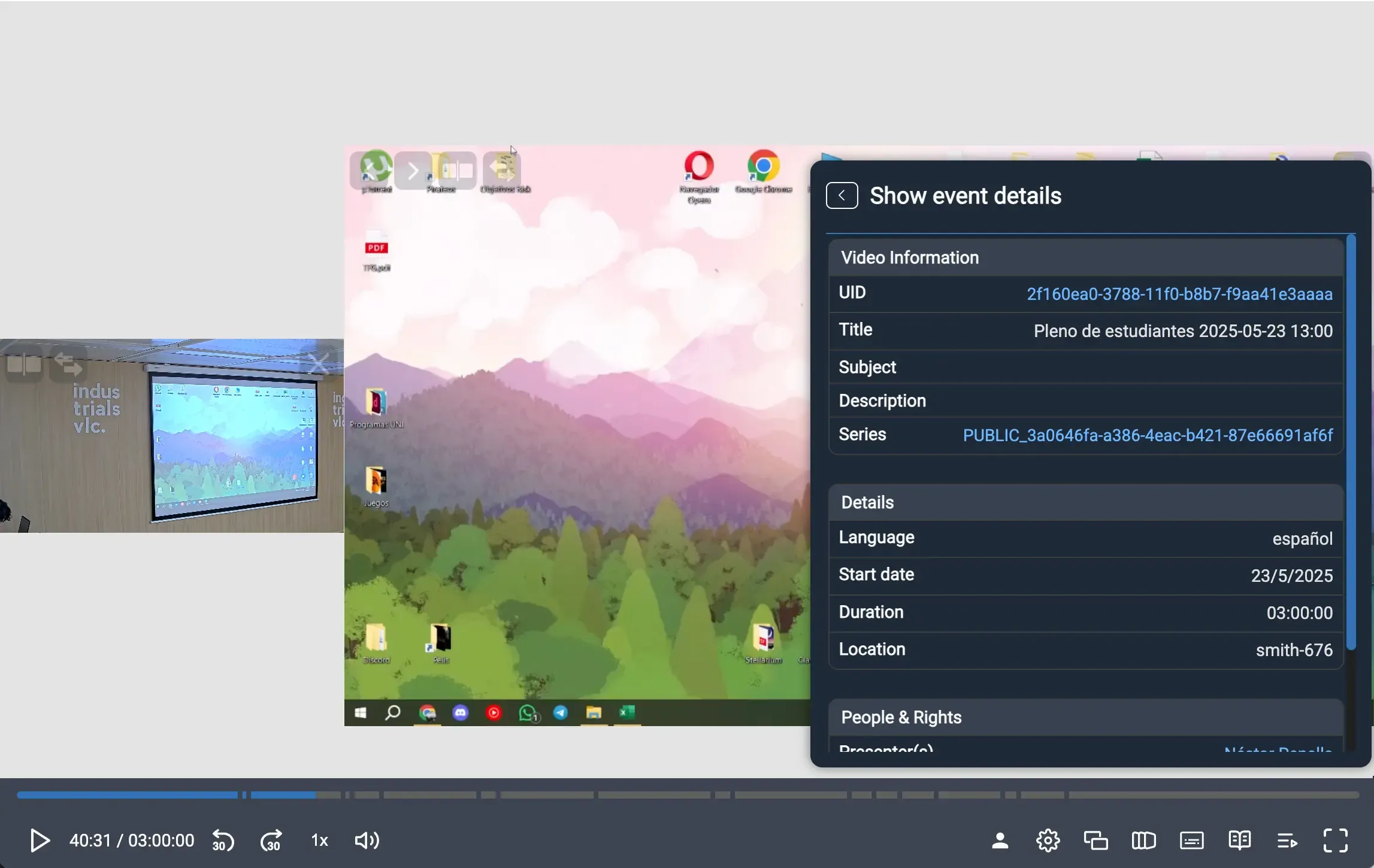
Section titled “org.opencast.paella.eventDetailsPlugin”This plugin adds an information button in the player interface that opens a popup window displaying detailed metadata about the current video event. The information is organized in a structured table format with different categories.
Exported as OpencastEventDetailsPlugin.
Configuration
Section titled “Configuration”You need to enable the org.opencast.paella.eventDetailsPlugin plugin.
{ "org.opencast.paella.eventDetailsPlugin": { "enabled": true }}Configuration parameters
Section titled “Configuration parameters”enabled: Enables or disables the plugin.- Valid values:
true/false
- Valid values:
Behavior
Section titled “Behavior”- Information source: Retrieves metadata from the current video event
- Links: If an Opencast presentation URL is configured, some fields become clickable links for navigation.
Functionality
Section titled “Functionality”The plugin displays information organized in three main categories:
Video Information
Section titled “Video Information”- UID: Unique identifier of the video (clickable link if Opencast URL is available)
- Title: The title of the video
- Subject: Subject or topic (clickable link for search if Opencast URL is available)
- Description: Full description of the video
- Series: Series information (clickable link if Opencast URL is available)
Details
Section titled “Details”- Language: Display name of the video language
- Start date: The date when the video was recorded or published
- Duration: Total duration in human-readable format
- Location: Recording location or venue
People & Rights
Section titled “People & Rights”- Presenter(s): List of presenters (clickable links for search if Opencast URL is available)
- Contributor(s): List of contributors (clickable links for search if Opencast URL is available)
- Rights: Rights holder information
- License: License under which the video is distributed
The popup provides a comprehensive overview of the video metadata, making it easy for users to understand the context and details of the content they are viewing.
Icon customization:
Section titled “Icon customization:”- Icon names:
buttonIcon